Where to Work in Santa Teresa: Wi-Fi, Noise, and Backup
Choose between coworking, cafés, or your rental based on call load, noise, and outage risk. Santa Teresa work spots only make sense when the Wi-Fi and backup plan match the job.
Key takeaways
- Where you work in Santa Teresa, Costa Rica should be decided by three things most guides skip: whether the connection holds a video call, how loud the room gets, and what happens when the power blinks.
- Santa Teresa coworking splits cleanly by budget: Selina Santa Teresa is the cheaper, more social choice, and Outsite is the curated one you pay more for.
- The best Santa Teresa café for work depends on your task, not the coffee.
- Match the choice to your call load and outage risk.
Where to work in Santa Teresa if you need reliable Wi-Fi and quiet calls
Where you work in Santa Teresa, Costa Rica should be decided by three things most guides skip: whether the connection holds a video call, how loud the room gets, and what happens when the power blinks. Cowork506 names Selina Santa Teresa as the go-to for budget-conscious nomads, Outsite as the more curated coliving-and-coworking setup, and Nordico Coffee House as a strong café pick for focused work with air conditioning and reliable WiFi.
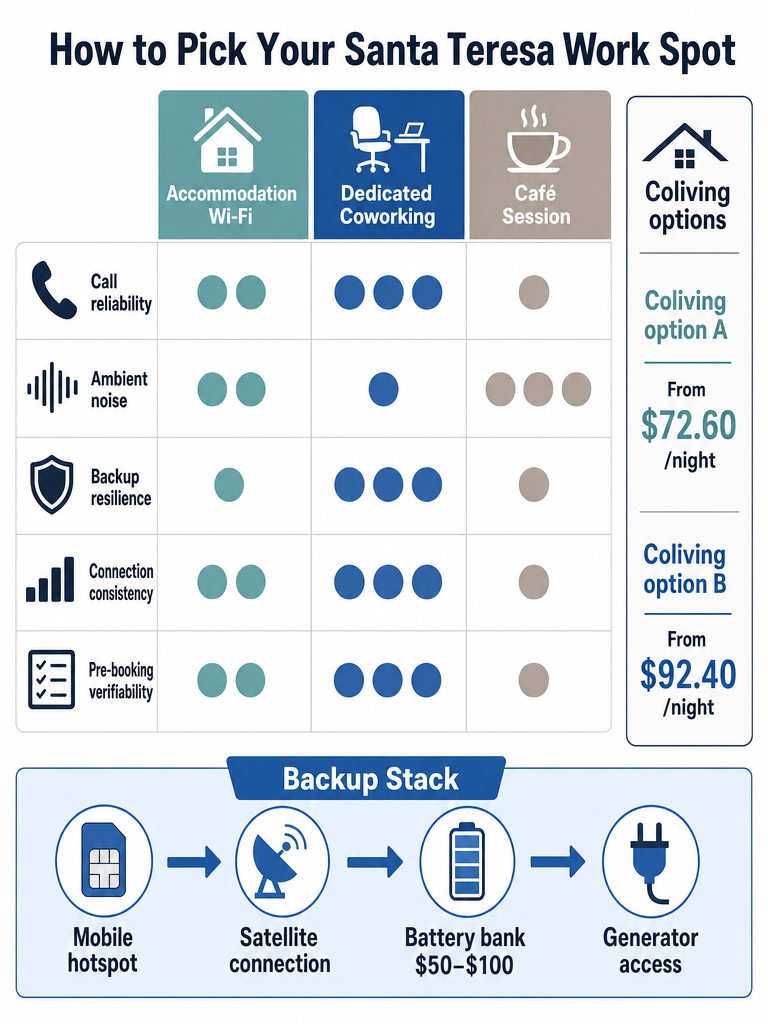
Sort your options into three buckets, not a ranked list. Call-safe spots are dedicated coworking and coliving where meetings won't drop mid-sentence. Café sessions cover writing, email, and light admin — Nordico Coffee House and Somos Café fit here — but Cowork506 flags Nordico as best for tasks that don't need heavy video conferencing. Accommodation-first means you work from your rental and treat a café or coworking as backup.
The catch is that Santa Teresa and Mal País share a single unpaved road, so where you sleep dictates how far you travel to any of these. Pick the bucket that matches your workload before you book a bed. If you're weighing the town as a base, the honest tradeoffs sit in what gets annoying fast for digital nomads here.
Santa Teresa coworking spaces with good WiFi: Selina, Outsite, SkyLoft, and Seas The Day
Santa Teresa coworking splits cleanly by budget: Selina Santa Teresa is the cheaper, more social choice, and Outsite is the curated one you pay more for. Cowork506 calls Selina Santa Teresa the go-to for budget-conscious nomads, while Outsite offers a more polished coliving-and-coworking experience. Cowork506 also names SkyLoft and Seas The Day as additional dedicated coworking options in the area.
Outsite runs two Santa Teresa coliving spaces built for remote workers, with fast WiFi and shared workspaces. Pricing and detail from Outsite:
| Space | Layout | From (nightly) | Rating |
|---|---|---|---|
| Santa Teresa - Maramar | 8 bedrooms | $72.60 | 4.5 |
| Santa Teresa - Playa | 4 apartments, 10 bedrooms | $92.40 | 4.8 |
(Source: Outsite)
Selina Santa Teresa runs a hostel-based, more social model — good energy, less silence. Amy Suto recommends both Outsite and Selina as coworking-and-coliving setups with good WiFi.
SkyLoft and Seas The Day are named by Cowork506, but current prices, day passes, hours, and speed tests are not in the public record and can't be verified here. Confirm directly before you commit a workweek to either.
If your day is call-heavy, the curated option earns its premium; if the week is mostly async, the budget setup handles it. For where these sit relative to beach and road, see where to stay in Santa Teresa by beach, road, and noise.
What are the best cafés to work from in Santa Teresa?
The best Santa Teresa café for work depends on your task, not the coffee. Cowork506 calls Nordico Coffee House a top pick for working sessions because it has air conditioning and reliable WiFi, but describes it as best for lighter sessions, writing, and tasks that don't require heavy video conferencing. Cowork506 also says The Roastery enforces a two-hour WiFi limit, which makes it a short-session spot rather than an all-day desk.
Match the venue to the work:
- Focused writing, email, light admin: Nordico Coffee House. Indoor and outdoor seating, air conditioning, calm atmosphere.
- Short bursts under two hours: The Roastery, given the WiFi cap.
- Daytime coworking with a social edge: Somos. Amy Suto says Somos works well as a daytime coworking café — but warns it has a party vibe and nightlife events that can disrupt sleep if you stay there.
- Poor fit for video calls: most cafés here, Nordico included, because café ambient noise and shared bandwidth undercut Zoom or Teams.
Café Social, Cafca Café, and the Somos Café listing all appear in local sources, but verified current hours, speed tests, call rules, and seating are not documented in available sources. Treat any specific claim about them as unconfirmed until you walk in. Somos Café shows up in the Cowork506 directory with high-speed WiFi and meeting rooms listed, though hours and pricing aren't verified.
How to choose between your rental, a coworking space, or a café in Santa Teresa
Match the choice to your call load and outage risk. If your week is mostly async work and light calls, a cheaper rental with a café backup handles it. If you run daily video meetings that can't drop, pay for coworking or a coliving space built for it — that's where reliability comes bundled with the room.
Use this as a quick decision framework:
- Count your live calls. Zero to two a week? A rental plus Nordico Coffee House for focus works. Daily meetings? Book coworking-grade WiFi.
- Check the price gap. Outsite Santa Teresa - Maramar starts at $72.60 nightly and Santa Teresa - Playa at $92.40 nightly (Source: Outsite). If a cheaper stay saves $40+ a night, that funds a lot of café coffee and coworking day passes.
- Test noise tolerance. Amy Suto notes Somos has a party vibe that disrupts sleep for people staying there — a coliving space with quiet hours may be worth the premium.
- Budget the whole month. Cowork506 says a comfortable Santa Teresa and Mal País lifestyle — accommodation, food, coworking, and ATV — runs $2,000–3,000 per month.
Higher-priced coliving like Outsite earns its cost when reliability and community both matter. A solid rental plus café backup covers everything else. Compare full nomad costs and friction in Santa Teresa for digital nomads.
How to find reliable WiFi in Santa Teresa before you book
Reliable WiFi in Santa Teresa comes down to consistency and room-by-room signal. Villas Pura Vida notes that "wifi included" can mean anything from fiber-fast service to a basic connection that struggles when several guests are online at once. The gap between those two is the difference between a working trip and a frustrating one.
Ask the host these specific questions before you pay — Villas Pura Vida frames the right ones:
- Which provider do you use, and is it fiber? Vague "the internet is good" answers aren't enough.
- What are the usual download and upload speeds? Uploads matter for calls and file sends.
- Where is the router? Concrete walls, room layout, and outdoor living areas cut signal; a villa can be strong in the living room and weak in a back bedroom.
- Can two people work online at the same time? Bandwidth for one isn't bandwidth for a couple.
- Do guests commonly take Zoom or Teams calls here? A confident host answers without hesitation.
Reviews beat listings. "Great wifi" is weak; "I worked remotely for two weeks without issues" is the signal you want, per Villas Pura Vida.
Villas Pura Vida makes the case that a quieter residential pocket slightly outside the busiest beach strip often means less call noise and a steadier setup for longer stays.
Keep reading
- Santa Teresa for Digital Nomads: What Gets Annoying Fast
- Where to Stay in Santa Teresa by Beach, Road, and Noise
- Do You Need a Car in Santa Teresa? The Honest Tradeoffs
- Santa Teresa Rainy Season: What Still Works, What Doesn't
- Santa Teresa Banking, ATMs, and Cash: What to Expect
- How to Get Around Santa Teresa Without Wasting Half a Day
What backup do you need if Santa Teresa power or Wi-Fi drops?
Build a backup stack, because Santa Teresa power outages are common in rainy season. The layers, per Waymon Hudson: primary fiber, a mobile hotspot, a battery backup, and — where available — Starlink or generator access. Waymon Hudson describes leading a full meeting on nothing but a phone hotspot during an outage, which is the failure mode you're planning around.
Here's the stack with sourced numbers:
| Layer | What it does | Sourced detail |
|---|---|---|
| Fiber internet | Primary connection | 100–500 Mbps, $40–$80/mo (Waymon Hudson) |
| Mobile hotspot | First fallback | Prepaid data from Kolbi, Claro, or Liberty (Waymon Hudson) |
| Battery backup | Rides out short outages | $50–$100, powers router + laptop 4–6 hours (Waymon Hudson) |
| Starlink | Wide-area satellite fallback | 100+ Mbps (Waymon Hudson) |
| Generator | Extended power loss | Some Santa Teresa Airbnbs have backup generators (Reddit r/digitalnomad) |
Cowork506 calls a local Kolbi SIM card essential for mobile backup and advises verifying accommodation WiFi speed before committing. Tigo is also named as a provider option by Waymon Hudson.
Have a backup for your backup. Waymon Hudson's rule — a $50–$100 battery holds a router and laptop for 4–6 hours — is the cheapest insurance against a dropped rainy-season meeting.
Rainy season makes this non-optional; see how the season reshapes daily plans in what still works in Santa Teresa's rainy season.
Mal País or Santa Teresa for remote work if road noise and transport matter?
For remote work, Santa Teresa is the busier, better-connected hub and Mal País is the quieter, often cheaper alternative — Cowork506 lays out that trade-off directly. Mal País gives you calm and lower costs but fewer coworking options and a longer ride to Santa Teresa's shops and nightlife. The two towns share a single unpaved road, so "quieter" also means "farther from everything you'll want at lunch."
Arrival logistics feed the same decision, per Cowork506:
- Ferry route: Puntarenas to Paquera runs about 1.5 hours, then roughly a 90-minute drive to Santa Teresa.
- Flight route: San José to Tambor is a 30-minute flight, then about a 45-minute drive.
- Nearest real town: Cobano, about 30 minutes away, with the bank, hospital, and well-stocked supermarket.
Amy Suto recommends staying on Santa Teresa's main road or as close as possible — useful if you want cafés and coworking on foot. Playa Hermosa sits at the north end of the main beach stretch.
Choose Mal País for quiet focus, or central Santa Teresa if you want to walk to work and back. Weigh the daily friction in Santa Teresa vs Mal País for surf stays and how to get around without wasting half a day.
Which Santa Teresa work spots need current verification before you commit?
Verify prices, hours, and call facilities in person before you build a workweek around any single venue — the public record on several is thin. Named coworking and café spots like SkyLoft, Seas The Day, Café Social, and Cafca Café appear in local sources, but current day-pass rates, opening hours, speed tests, and call-booth availability are not documented in available sources.
What's still unverified, and what to check on the ground:
- Selina Santa Teresa, SkyLoft, Seas The Day: current prices, day passes, private rooms, and quiet hours.
- Somos Café, Café Social, Cafca Café, The Roastery: exact hours, music policy, seating, and whether calls are tolerated. Cowork506's two-hour WiFi note on The Roastery is the only hard rule available.
- Outage procedures: which venues actually run generators or a UPS. None are documented in available sources.
- Stolas Guesthouse and WiFi Tribe: named in nomad circles, with no verified current detail on either.
- Amy Suto's café and lodging notes: treat as one experienced nomad's account, not a live status check.
When a source can't confirm a price, a speed, or a call policy, walk in and ask before you commit. Onda Teresa visits listings in person for exactly this reason; independent WhatsApp groups and local community boards are the fastest way to sanity-check a venue's current state.
Sources
- Working Remotely in Santa Teresa, Costa Ricavillaspuravida.com
- Can anyone recommend good places to work in santa ...www.outsite.co
- How to Find Reliable WiFi in Santa Teresawww.amysuto.com
- Santa Teresa Coliving + Community for Remote Workerswww.waymonhudson.com
- Working Remotely in Santa Teresa, Costa Ricacowork506.com
- Nordico Coffee House – Santa Teresa - Cowork506www.reddit.com
FAQ
What are the best coworking spaces in Santa Teresa for remote workers who need reliable WiFi?
Selina Santa Teresa is the budget-friendly social option; Outsite runs two more polished coliving-and-coworking spaces. Outsite Santa Teresa - Maramar (8 bedrooms, from $72.60/night, rated 4.5) and Santa Teresa - Playa (10 bedrooms, from $92.40/night, rated 4.8) both include fast WiFi and shared workspaces. SkyLoft and Seas The Day are also named as dedicated coworking options, but current day-pass rates and speed specs aren't publicly verified — confirm before committing a full workweek.
Which cafés in Santa Teresa are best for working remotely?
Nordico Coffee House is the strongest café pick for focused work: air conditioning, indoor and outdoor seating, and reliable WiFi. Cowork506 flags it as best for writing, email, and light admin — not heavy video calls. The Roastery enforces a two-hour WiFi limit, making it a short-session spot only. Somos Café lists high-speed WiFi and meeting rooms but runs nightlife events that can disrupt anyone staying on-site.
How much does it cost to live and work remotely in Santa Teresa for a month?
A comfortable month in Santa Teresa or Mal País — covering accommodation, food, coworking, and ATV rental — runs $2,000–$3,000, according to Cowork506. Fiber internet, where available, adds $40–$80/month. The range is wide because coliving like Outsite starts at roughly $72.60/night, while a private rental backed by café day passes costs considerably less.
What backup should I set up in case Santa Teresa Wi-Fi or power goes out?
Build a four-layer stack: fiber as primary (100–500 Mbps, $40–$80/month), a mobile hotspot on Kolbi, Claro, or Liberty as first fallback, a $50–$100 battery backup that powers a router and laptop for 4–6 hours, and Starlink (100+ Mbps) or a generator where available. Power outages are common in rainy season — Waymon Hudson describes running a full meeting on a phone hotspot during one, which is exactly the scenario worth planning around.
Is Mal País or Santa Teresa better for remote work?
Santa Teresa is the better-connected hub with more coworking options and walkable cafés; Mal País trades that convenience for lower costs and less noise. Both towns share a single unpaved road, so choosing Mal País means a longer ride to Santa Teresa's coworking, shops, and restaurants at lunch. If your day is call-heavy and you want options on foot, central Santa Teresa wins. If your schedule is async and quiet focus matters more, Mal País is worth the trade-off.
What questions should I ask a Santa Teresa rental host before booking to verify WiFi quality?
Ask which provider they use and whether it's fiber, what the typical download and upload speeds are, where the router is located (concrete walls cut signal room to room), and whether two people can work online simultaneously. Then check reviews for guests who mention sustained remote work — "I worked remotely for two weeks without issues" is far more useful than a generic "great WiFi" comment, per Villas Pura Vida.
Santa Teresa eSIM and SIM Cards on Arrival
For most Santa Teresa trips, an eSIM is the cleanest answer: install it before you fly, keep your home number active, and arrive already connected. Buy a physical Costa Rican SIM only when you need a local number for calls, drivers, or a longer stay.
Read →Santa Teresa Pharmacies and Clinics: Where to Go
Public, verifiable pharmacy and clinic details for Santa Teresa are thin, and search results often mix in Wichita listings. This guide shows what to ignore and how to confirm care locally on the day.
Read →Santa Teresa Grocery Stores and Markets: What to Expect
Santa Teresa works best for daily top-ups, while Cóbano is the smarter larger shop. Mini markets cover water, eggs, bread, coffee, beer, and fruit.
Read →